1Password vs Aura Password Manager comparison in 2026
Being behind major reports like The Mother of All Breaches and WhatsApp Data Leak, our in-house cybersecurity experts conduct independent, unbiased testing and thorough analysis of password managers, helping users confidently manage their credentials and sensitive information.
We prioritize transparency by openly sharing detailed descriptions of our in-house testing procedures and methodologies.
Learn more

1Password and Aura both protect passwords, but they are built for different users. 1Password is a long-standing dedicated password manager known for its polished apps, strong security, and advanced vault tools, while Aura offers a simpler password manager bundled with antivirus, a VPN, and optional identity protection features.
To compare 1Password vs Aura Password Manager in 2026 fairly, I evaluated Aura’s password manager separately because its subscription also includes extra tools, such as VPN and antivirus. However, I still covered the main benefits of Aura’s wider bundle. The following comparison mainly focuses on pricing, features, security, platform support, customer service, and overall value.
Not to spoil, but the final result is clear. 1Password is the stronger password manager, while Aura is the more complete identity protection bundle. Keep reading for the full breakdown.




Our in-house research team thoroughly analyzes password managers, and our team of experts uses the gathered insights and hands-on experience to evaluate each provider accordingly. Find out how we assess password managers.
What are the key differences between 1Password and Aura?
1Password is overall one of the best password managers on the market and is built solely for credential management, while Aura combines a simpler password manager with antivirus, a VPN, and other security extras.
Judged solely on password management, 1Password wins easily with better apps, vault tools, passkeys, sharing, and security features. That said, Aura makes much more sense if you also want credit monitoring, insurance, antivirus, and a VPN.
Here is a quick overview:
| Category | 1Password | Aura Password Manager |
| Pricing | From $1.99/month | From $1.99/month |
| Main purpose | Dedicated password management | Password management with antivirus, a VPN, and optional identity protection |
| Storage options | Unlimited credentials, secure notes, payment details, identities, files, passkeys, SSH keys, and API tokens | Unlimited passwords, plus 1GB of secure file storage with Deluxe and Ultimate plans |
| Standout tools | Watchtower, Travel Mode, Secret Key, passkeys, multiple vaults, and developer tools | Email aliases, breach alerts, antivirus, unlimited VPN, phishing protection, and identity monitoring on higher tiers |
| Desktop apps | ✅ Windows, macOS, and Linux | ❌ No dedicated desktop password manager |
| Browser extensions | Chrome, Firefox, Edge, Safari, and Brave | Chrome, Firefox, and Edge |
| Free option | ✅ Yes, 14-day free trial | ✅ Yes, 14-day free trial |
| Money-back guarantee | ❌ No | ✅ Yes, 60 days |
| Best for | Individuals, families, teams, and businesses in need of advanced password management | Users who want an affordable password manager bundled with device security and optional identity protection |

Pricing: winner 1Password
1Password and Aura Password Manager both start at $1.99/month for the first year. However, 1Password takes the category because the Individual plan works on unlimited devices and includes the full password manager, while Aura Value covers only three devices.
Here is how 1Password vs Aura pricing compares:
| Plan and terms | 1Password | Aura Password Manager |
| Starting plan | $1.99/month | $1.99/month |
| Family option | From $2.99/month | Aura Family available through the wider identity protection suite at $29.00/month |
| Teams plan | $19.95/month for 10 members annually | ❌ Not available |
| Business plan | $7.99/month per user annually | ❌ Not available |
| Free trial | ✅ 14 days | ✅ 14 days |
| Money-back guarantee | ❌ No | ✅ 60 days |
At first glance, this looks like a tie. Both entry plans cost $1.99/month, but 1Password gives one user unlimited device access. Aura limits its Value plan to only three devices, which can disappear quickly once you count a phone, laptop, tablet, or second computer.
Aura does give you a lot alongside the password manager. Even the cheapest plan includes antivirus, an unlimited VPN, email aliases, and phishing protection. If you would use those tools anyway, Aura offers excellent first-year value.
That said, for password management alone, 1Password gives you much more for the same starting price. You get passkeys, Watchtower, Travel Mode, multiple vaults, secure sharing, and dedicated desktop apps without a device cap.
Families also get a more suitable setup with 1Password. Its Families plan covers up to five users and adds shared vaults, permissions, and account recovery. Aura does offer a Family plan, but only through Aura’s broader identity protection service, starting at $29.00/month, which is considerably more expensive, but it includes identity protection, insurance, parental controls, and other security tools.
Where Aura also wins is in refunds, with a generous 60-day money-back guarantee, while 1Password offers only a 14-day free trial. Just watch the renewal price, since some 1Password discounts only apply for the first year.
Password management features: winner 1Password
1Password wins the features category also by a comfortable margin. When it comes purely down to password management, Aura covers the basics, but 1Password goes much further with passkeys, multiple vaults, Travel Mode, advanced sharing, and developer tools.
Here is a quick feature comparison:
| Feature | 1Password | Aura Password Manager |
| Core password management tools | ✅ Password generation, autosave, autofill, imports, sharing, and breach alerts | ✅ Password generation, autosave, autofill, CSV imports, sharing, and breach alerts |
| Password health | ✅ Watchtower checks weak, reused, and compromised passwords | ✅ Alerts for weak and compromised passwords |
| Secure storage | ✅ Secure notes, files, addresses, identities, and multiple vaults | ✅ Notes and files through Aura Vault |
| Credit card storage and autofill | ✅ Available | ✅ Available |
| Email masking | ✅ Available through Fastmail integration | ✅ Available |
| Family sharing | ✅ Shared vaults, permissions, and account recovery | ✅ Basic sharing with members on the same plan |
| Virtual payment cards | ✅ Available | ❌ Not available |
| Passkeys | ✅ Available | ❌ Not available |
| Travel Mode | ✅ Available | ❌ Not available |
| Developer tools | ✅ CLI, SDKs, SSH key signing, and Git commit signing | ❌ Not available |
Both services offer the basic password management essentials, including password generation, autosave, autofill, syncing, imports, and breach alerts. The difference is how much control you get once your vault grows beyond a few saved logins.
1Password makes it easier to organize different types of sensitive data, utilize developer tools, keep personal and shared items separate, and spot weak or compromised passwords through Watchtower. Aura keeps things much simpler, which may suit casual users, but it can be limiting as your vault grows.
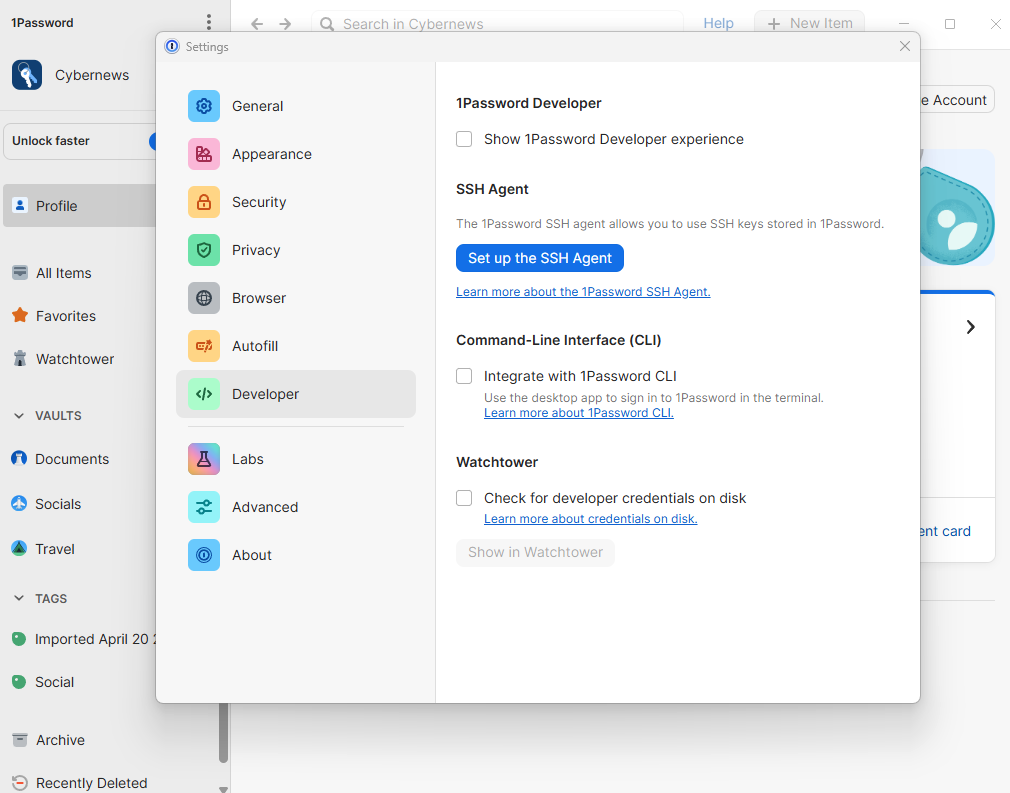
Travel Mode is another useful 1Password advantage. It lets you temporarily remove selected vaults from your devices while traveling, then restore them later. Aura does not offer anything similar.
1Password also supports passkeys, making it a better long-term option as more websites move away from traditional passwords. Aura does not support passkeys.
To top it all off, 1Password even offers Privacy Cards integration, which creates virtual card details for safer online payments. You can set spending limits or make a card work with only one store. Aura can save regular credit cards, but it does not offer virtual cards.
Aura Password Manager’s main advantage is built-in email masking, which lets you create aliases instead of sharing your real email address. Even here, however, 1Password can offer the same benefit through its Fastmail integration.
Identity theft protection and bundled extras: winner Aura
From a broader identity protection tools perspective, Aura wins easily. Even the cheapest Value plan adds antivirus, an unlimited VPN, and scam and phishing site protection. The higher tiers introduce identity monitoring, fraud recovery, credit protection, and other financial security tools.
Here is how the wider protection features compare:
| Identity and security tools | 1Password | Aura Password Manager plans |
| Antivirus | ❌ Not available | ✅ Included with all plans |
| VPN | ❌ Not available | ✅ Unlimited VPN with all plans |
| Scam and phishing protection | ❌ Not available | ✅ Included with all plans |
| Ad and tracker blocking | ❌ Not available | ✅ Deluxe and Ultimate |
| Identity monitoring | ❌ Not available | ✅ Online account, Social Security number, and personal information monitoring with Deluxe and Ultimate |
| Credit and financial monitoring | ❌ Not available | ✅ One-bureau credit, bank fraud, and transaction monitoring with Ultimate |
| Identity theft insurance | ❌ Not available | ✅ Up to $1 million with Ultimate |
| Fraud recovery | ❌ Not available | ✅ White Glove Fraud Resolution with Ultimate |
Aura is very generous with extras, even on its entry-level Value plan. Alongside the password manager, it protects up to three devices with real-time antivirus, an unlimited VPN, email alias protection, and scam and phishing website warnings. Aura Deluxe covers five devices and adds tracker blocking, 1GB of secure file storage, account and personal information monitoring, plus spam call and junk mail removal
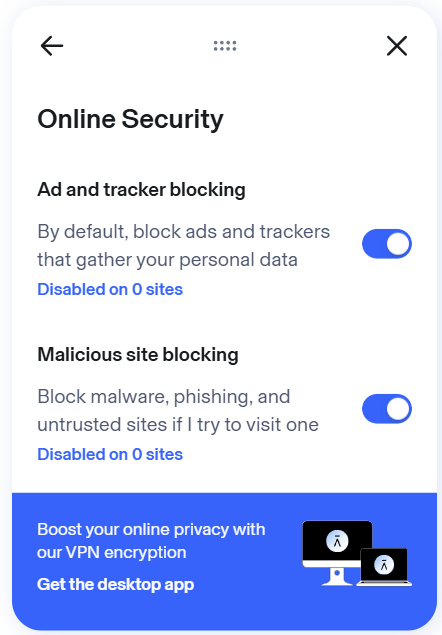
Aura Ultimate raises coverage to 10 devices and adds the strongest extras, including $1 million in identity theft insurance, fraud recovery, credit monitoring, credit lock, bank fraud alerts, and transaction monitoring. Aura also sells separate Individual, Couple, and Family identity protection plans with the full Aura protection package, offering an even broader set of credit and family-focused tools.
On the other hand, 1Password focuses solely on password management and covers it in much greater depth. This keeps the quality high of credential monitoring alone and prevents users from paying for extras they may not need, while still allowing them to choose a separate VPN, antivirus, or identity protection service.

Security and trust: winner 1Password
1Password and Aura both get the security basics right. They use zero-knowledge architecture, encrypt vault data locally, and cannot access your master password or stored credentials. This category is much closer than the feature comparison, but 1Password still edges ahead with its Secret Key and stronger public security documentation.
| Security and trust | 1Password | Aura Password Manager |
| Encryption | AES-256-GCM | AES-256 |
| Zero-knowledge architecture | ✅ Available | ✅ Available |
| Local encryption and decryption | ✅ Available | ✅ Available |
| Built-in authenticator | ✅ Available | ✅ Available |
| Password breach alerts | ✅ Watchtower | ✅ Available |
| Phishing protection | ✅ Through browser and Watchtower protections | ✅ Available |
| Independent audits | ✅ Audited | ✅ Audited |
| Account recovery | ✅ Personal recovery codes, plus organizer or admin-assisted recovery for families and teams | ✅ Email-based password reset |
| Security documentation | ✅ Extensive | ⚠️ Less detailed |
| Passkey support | ✅ Available | ❌ Not available |
| Secret Key | ✅ Available | ❌ Not available |
The actual vault protection is solid on both sides. Aura encrypts passwords with AES-256 before syncing them to its servers, and only the master password can unlock the vault. Aura cannot simply open your account and browse through your saved logins.
However, 1Password adds one extra layer through its Secret Key. This unique code works alongside your account password, so stealing or guessing the password alone is not enough to decrypt the vault.
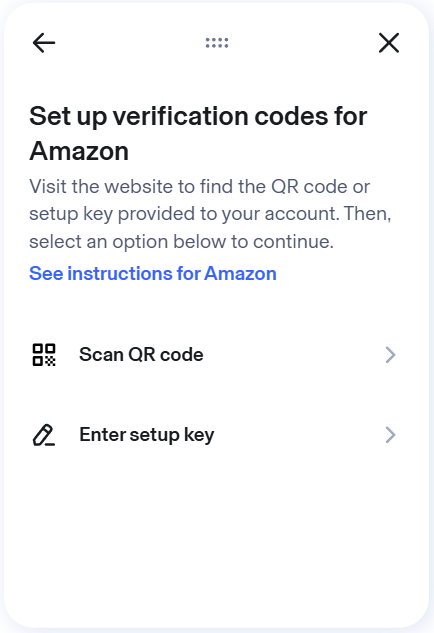
Aura is not empty-handed here either. It includes a built-in authenticator for one-time login codes and phishing protection that can warn users about suspicious websites. Those are genuinely useful additions for secure password management.
Both providers report independent security reviews and hold ISO 27001 and SOC 2 Type II certifications. However, 1Password shares more report details through published assessments, regular penetration testing, and its public HackerOne bug bounty program. It also supports passkeys, which Aura still lacks.
Finally, 1Password also offers stronger recovery options. Individuals can generate recovery codes, while family organizers and team administrators can restore access without deleting the user’s vault data. Aura uses a simpler email-based password reset through the main Aura account.
Ease of use and compatibility: winner 1Password
1Password wins overall in the compatibility area because it offers dedicated apps for every major desktop and mobile platform. However, Aura deserves credit for its browser experience, which was one of the simplest and most intuitive I tested.
| Platform support | 1Password | Aura Password Manager |
| Desktop | Dedicated apps for Windows, macOS, and Linux | Web dashboard and browser extensions only |
| Mobile | iOS, iPadOS, Android, and Apple Watch | iOS and Android |
| Browser extensions | Chrome, Firefox, Edge, Safari, and Brave | Chrome, Firefox, and Edge |
| Cross-device access | Unlimited devices, automatic sync, and offline access after syncing | Automatic sync across supported browsers and mobile devices |
Desktop apps
The desktop comparison is where Aura falls behind most clearly. 1Password offers dedicated apps for Windows, macOS, and Linux, while Aura Password Manager entirely relies on its web dashboard and browser extensions.
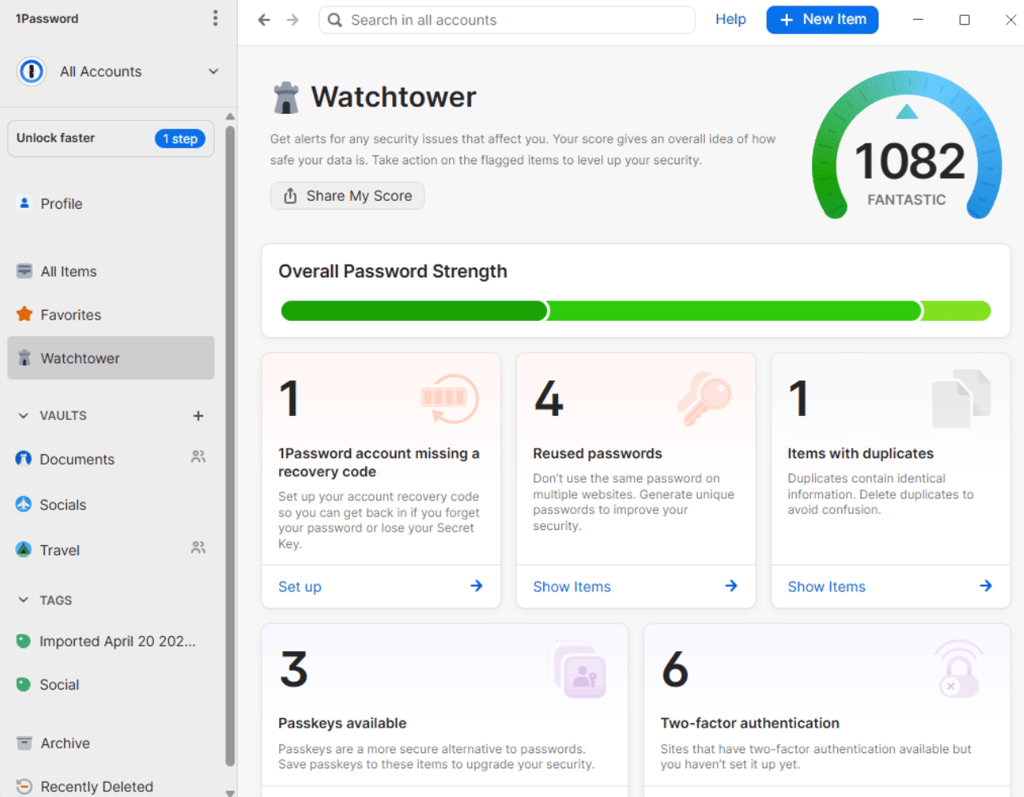
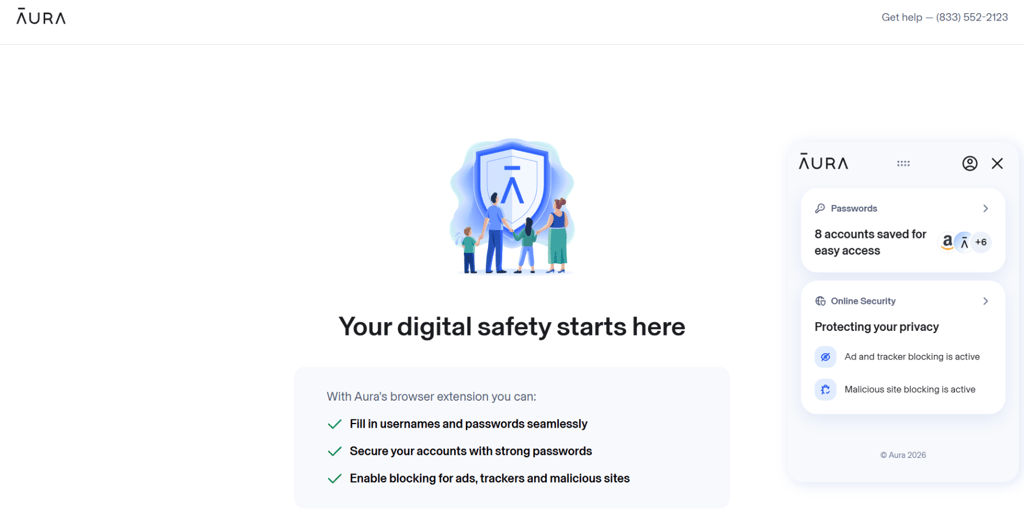
The 1Password desktop app gives direct access to vaults, Watchtower, passkeys, secure notes, payment details, and account settings. I could manage everything without opening a browser, and 1Password also supports offline access after the vault has synced.
Aura’s web dashboard is more limited, but its browser extension was one of the easiest I tested. It works as a small widget that stays available while browsing, and the simple interface made saved passwords and account actions easy to find. Aura correctly detected every login page I tried, entered the correct credentials, and suggested a new password when I created an account.
Still, Aura does not offer a full desktop password manager. The extension works very well inside Chrome, Firefox, and Edge, but users have fewer options outside the browser.
Browser extensions
As already mentioned, Aura’s browser extension is simple and genuinely easy to use. It stays available as a floating widget, detects login pages, fills saved credentials, and suggests passwords for new accounts without making you dig through menus.
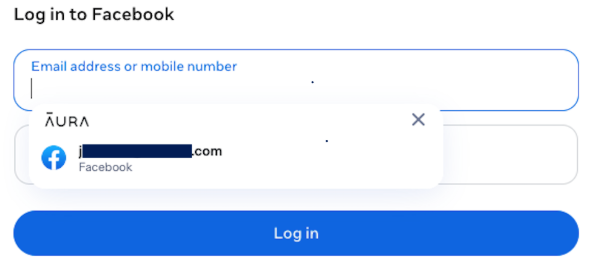
1Password also places suggestions directly below login, payment, and address fields. I rarely needed to open the extension because the correct login appeared exactly where I needed it. If several accounts match the same website, I can then simply start typing to narrow down the options.
That said, 1Password’s extension goes far beyond passwords. It can fill credit card and address fields, generate one-time authentication codes, and even save and use passkeys without sending you back to the desktop app.
Aura’s extension does the common tasks with less clutter, so I would not call it difficult or poorly designed. However, 1Password supports many more credential types while requiring fewer manual steps. Aura is excellent at staying out of the way, but 1Password simply eliminates the need to open the extension most of the time.
Mobile apps
Both 1Password and Aura offer iOS and Android apps, and their setups are pretty standard and intuitive. After enabling autofill in my phone settings, saved passwords synced across devices and appeared when I opened supported apps or websites.
Both mobile apps also support biometric access. 1Password can protect passwords, payment cards, and other vault items with Face ID, Touch ID, or Android biometrics, while Aura uses the device’s local biometric hardware, including Face ID and Touch ID through Apple’s Secure Enclave.
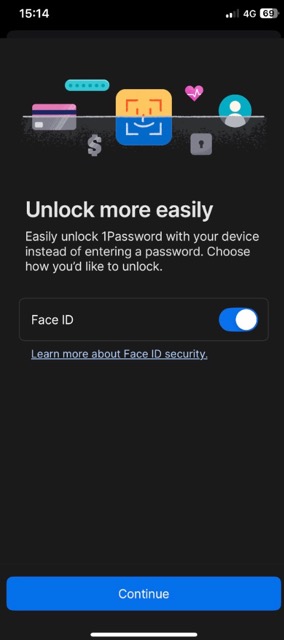
1Password overall gives more control on a mobile device. I could manage vaults, secure notes, and passkeys without returning to the desktop app. 1Password also supports Apple Watch and can even unlock the Mac app with a compatible Apple Watch. Aura does not list comparable watchOS support.
That said, Aura was easier to pick up because the password manager section is very simple. Autofill worked well in my testing, and saved logins appeared without much input from me.
Overall, the trade-off is simply that Aura offers fewer dedicated password management features. Its password manager sits inside the wider Aura app, which is packed with identity protection tools, but 1Password provides a more complete experience without making the app difficult to use.
Customer support: winner Aura
When it comes to Aura vs 1Password customer support, Aura wins without much debate. Both providers offer help centers and direct support, but Aura adds daily live chat from 8 AM–8 PM Eastern Time and 24/7 phone support.
Here are the main differences:
| Support option | 1Password | Aura |
| Live chat | ⚠️ Available from Monday to Friday 4 AM–8 PM EST, but response times may vary | ✅ Available daily from 8 AM–8 PM EST |
| Phone support | ❌ Not available for regular clients | ✅ Available 24/7 |
| Help center | ✅ Available | ✅ Available |
| Email support | ✅ Available | ✅ Available |
| Community forum | ✅ Available | ❌ Not hosted |
| Support requests | ✅ Available | ✅ Available |
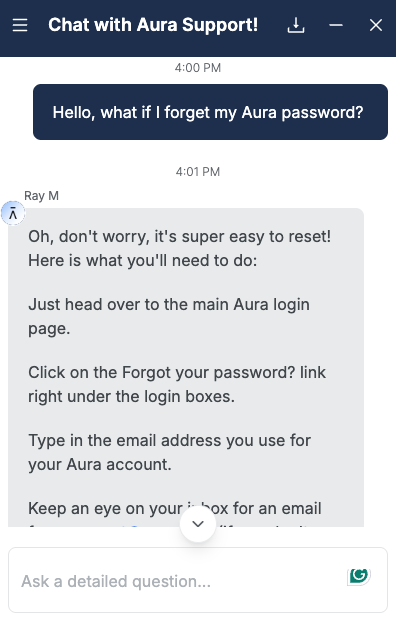
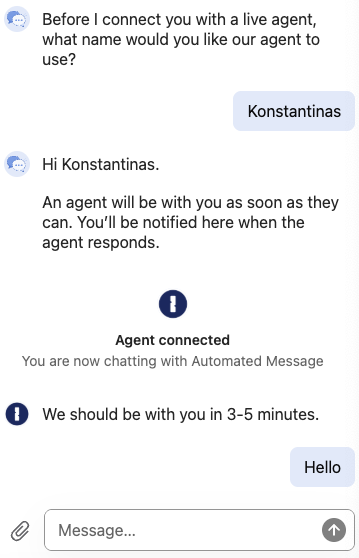
The difference between 1Password’s and Aura’s support during the test was not subtle. 1Password’s chatbot told me that a live agent would reply within 3–5 minutes, but it took roughly 20 minutes for an agent to join, and their answers also took a while, usually every 2–4 minutes.
Aura performed much better. A support agent joined in under 30 seconds and answered my question within a minute. That is a big win for Aura, especially when password or account problems need a quick fix.
Overall, Aura provides support for a wider range of problems. Its team can assist with password manager setup, identity monitoring, insurance claims, and identity fraud recovery.
Aura’s White Glove Fraud Resolution service is especially valuable after suspected identity theft. This support goes far beyond what a dedicated password manager normally provides.
That said, 1Password has the better self-help library, with detailed guides covering every app, Secret Key recovery, browser extensions, billing, family accounts, business tools, and developer features. Still, documentation only gets you so far, especially when you need urgent help from an actual person.
1Password vs Aura: key similarities
1Password clearly offers more depth when it comes to password management, but both services cover the everyday password manager basics well. In my testing, each one could save logins, suggest stronger passwords, autofill credentials, sync changes across devices, and warn me when an account needed attention.
| Shared capability | 1Password | Aura Password Manager |
| Password storage, generation, autosave, autofill, and imports | ✅ Yes | ✅ Yes |
| Zero-knowledge security and password alerts | ✅ Yes | ✅ Yes |
| Cross-device sync and secure sharing | ✅ Yes | ✅ Yes |
| Secure notes, files, and personal data storage | ✅ Yes | ✅ Yes |
| Mobile apps, browser extensions, and biometric login | ✅ Yes | ✅ Yes |
Password storage and autofill
Both services handled the basic login process without much effort. Aura’s extension caught every login page I tested, while 1Password worked just as reliably and let me separate personal, work, and shared logins into different vaults.
Both also support password imports, so you do not have to rebuild your vault from scratch. Aura mainly uses CSV files, while 1Password supports more import options.
Vault security and password alerts
1Password and Aura both use zero-knowledge encryption, which means neither provider can read the passwords stored in your vault. Both also warn about weak or exposed credentials. While 1Password goes further with Watchtower, each service still gives you a clear way to spot accounts that need attention.
Secure storage and biometric access
Both 1Password’s and Aura’s vaults can hold more than website logins. Aura’s Vault stores files and personal details, while 1Password also includes dedicated sections for payment cards, identities, and secure notes.
On mobile, both services support biometric access. I could open the vault using Face ID, Touch ID, or supported Android biometrics instead of typing the account password every time.
1Password or Aura: final verdict
When pitting 1Password vs Aura, the clear winner is 1Password if you only need a password manager. It works on more platforms and offers stronger vault tools, passkeys, Watchtower, Travel Mode, and better organization.
On the other hand, Aura is the better fit if you want password management as part of a broader security package. Its password manager covers the basics, while the wider plan selection adds identity monitoring, credit protection, antivirus, a VPN, insurance, and fraud support.
Here is the final category breakdown:
| Category | 1Password | Aura Password Manager |
| Pricing | ✅ | ❌ |
| Features | ✅ | ❌ |
| Identity protection and bundled extras | ❌ | ✅ |
| Security and trust | ✅ | ❌ |
| Ease of use and compatibility | ✅ | ❌ |
| Customer support | ❌ | ✅ |
Does Aura have a password manager?
Yes, Aura has a password manager, but it's bundled with Aura’s wider security and identity protection suite. Aura Password Manager is not sold as a standalone product. It can generate, save, sync, share, and autofill passwords and also includes an encrypted Vault, breach warnings, and email aliases.
Is 1Password better than Aura?
Yes, 1Password is better than Aura when it comes to password management. It offers dedicated desktop apps, passkey support, multiple vaults, Travel Mode, advanced sharing controls, and wider browser compatibility. Aura is better when users also need a larger bundle of security services, such as credit monitoring, identity theft insurance, antivirus, a VPN, and fraud recovery support.
Is Aura’s password manager safe?
Yes, Aura Password Manager is safe. It uses AES-256 encryption and a zero-knowledge architecture, so Aura cannot read your vault data. It also supports biometric login and alerts you about weak or exposed passwords.
Do 1Password and Aura support passkeys?
Only 1Password supports saving and using passkeys across compatible devices. Aura Password Manager does not currently offer passkey support, making 1Password the better choice for passwordless logins.
Can you buy Aura’s password manager separately?
Yes. Aura offers dedicated Password Manager plans starting at $1.99/month for the first year. These plans also include extras such as antivirus, an unlimited VPN, phishing protection, and email aliases.
Is 1Password worth it compared to Aura?
Yes. 1Password is worth it if you want stronger password management, unlimited devices, passkeys, Watchtower, and Travel Mode. Aura offers better value if you also need antivirus, a VPN, and identity protection tools.