Aura Password Manager review: is it still safe in 2026
Being behind major reports like The Mother of All Breaches and WhatsApp Data Leak, our in-house cybersecurity experts conduct independent, unbiased testing and thorough analysis of password managers, helping users confidently manage their credentials and sensitive information.
We prioritize transparency by openly sharing detailed descriptions of our in-house testing procedures and methodologies.
Learn more
Aura is primarily recognized as an identity theft protection platform. Not all users know that it also offers a password manager. What’s more, instead of being a standalone product, Aura's password manager is part of a digital protection suite designed to safeguard more than just your passwords.
For this Aura Password Manager review 2026, I tested it myself and gathered first-hand experience and insights, which I share with you below. During testing, I focused on Aura’s security, features, ease of use, pricing, and compatibility to help you decide if this password manager is the right choice for you.
Aura Password Manager review: my verdict at a glance
Aura has what it takes to compete with the best password managers currently available on the market. Thanks to its all-in-one security approach, it's much more than a password manager, as it combines antivirus, VPN, and identity theft protection tools for the overall security of your device.
| ⭐ Rating | 4.2★★★★★ |
| 🥇 Overall rank | #12 out of #20 |
| 💵 Price | From $1.99/month |
| ✂️ Free version | No |
| 🌐 Browser extensions | Chrome, Firefox, Edge, Safari |
| 🔥 Coupons | Aura coupon 53% OFF |
Aura pros and cons 2026
Deciding to choose a password manager means weighing its strengths and weaknesses. Here's a quick look at Aura Password Manager's pros and cons in 2026.
How much does Aura cost? plans and pricing
Aura is an average-priced password manager that costs from $1.99/month. In total, it offers 3 plans. They all include identical password manager features, such as saving and autofilling, unlimited storage, password generator, compromised password alert, and email alias protection.
The main differences I found in the bundled services are that they include online and device security, as well as identity protection. Here’s a quick overview of what each plan offers:
| Plan | Price | What it offers | Number of supported devices |
| Value | $1.99/month | real-time antivirus protection, unlimited VPN, scam and phishing site protection | Up to 3 |
| Deluxe | $2.99/month | everything in the Value plan, plus Anti-Track & Ad Block, 1GB Sensitive Files Vault, Online Account Monitoring, SSN & Personal Info Monitoring, Spam Call & Junk Mail Removal | Up to 5 |
| Ultimate | $3.99/month | everything in the Deluxe plan, plus Premium Identity Protection and Financial Fraud Protection, including $1M identity theft insurance, White Glove Fraud Resolution, identity verification, home & auto title, criminal & court records, 1-bureau credit, credit lock, and bank fraud monitoring, and financial transaction monitoring | Up to 10 |
Given that all Aura’s plans include additional tools, its pricing is more than reasonable. Also, for only $1.00 extra a month, you can get Aura identity theft protection. For price comparison, a password manager bundled with a VPN from Dashlane starts at $4.07/month, while NordPass’ bundles with VPN will cost you from $4.49/month.
Also, quite a few password managers, such as NordPass and RoboForm, offer solid free versions. However, Aura has no such option, yet it includes an extended 60-day money-back guarantee, which is exceptionally long compared to other password managers.
Is Aura Password Manager safe?
Yes, Aura Password Manager is considered one of the safest password managers currently available on the market. It uses AES-256 encryption and a zero-knowledge architecture, so your passwords are secure and accessible only to you.
| Security feature | What it does |
| AES-256 encryption | Protects your data by encrypting it |
| Zero-knowledge architecture | Keeps your passwords and data private as even Aura can’t read them |
| 2FA | Protects your Aura account with an extra layer of security by requiring a second verification step when you sign in |
| Compromised password alert | Notifies you if any of your saved passwords are exposed in a known data breach |
| Independent security audits | Aura has earned ISO 27001 and SOC 2 Type II certifications |
| Scam & Phishing Site Protection | Warns you about malicious, phishing, and scam websites before you visit them. |
| Dark web monitoring | Tracks your personal identifiable information across the dark web, data breaches, and other places malicious hackers use and warns you if it has been leaked |
Also, Aura includes dark web monitoring that continuously scans for compromised credentials and alerts you if your information is found. What’s more, Aura has no known data breaches.
With Aura, you can additionally strengthen your account protection by enabling two-factor authentication (2FA) in your Aura account settings. However, it doesn’t secure your stored logins and has to be turned on by default.
Aura Password Manager features
When I tested Aura Password Manager, it made a good impression: it was simple to use and worked well. It offers all the core features, such as autofill, password generator, and vault, necessary to protect passwords and sensitive data. Below, I provide an overview of each Aura’s feature in more detail.
| Feature | What does it do |
| Autofill | Automatically fills in your saved credentials on websites and apps |
| Password generator | Creates strong, unique passwords to help protect your accounts |
| Password vault | Securely stores your passwords, passkeys, payment cards, and other sensitive information in one encrypted vault |
| Email Alias Protection | Lets you create masked email addresses to hide your real email and reduce spam, phishing, and data exposure |
| Online security | Protection against scams and phishing sites, with higher-tier plans adding ad and tracker blocking, anti-tracking, and a secure file vault |
Autofill
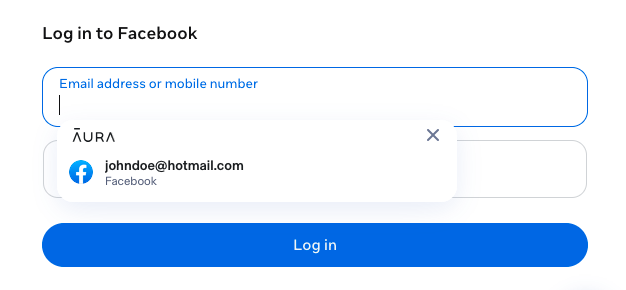
To start, I set out to test one of the most important features of any password manager – autofill. In a browser extension, Aura successfully detected every login page I tried it on, including Facebook, GitHub, Gmail, and X, entered the required credentials, and suggested passwords for new accounts.
For example, when I tested NordPass to compare it to Aura on a browser, the autofill on Facebook and X was sometimes inconsistent. With Aura, I didn’t have such an experience.
Password generator
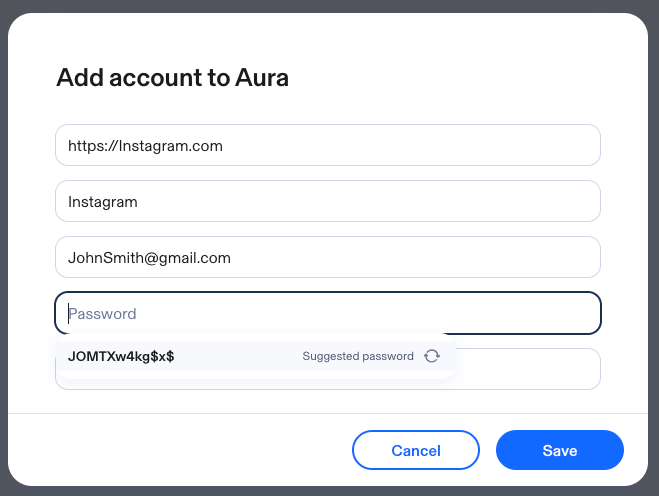
Aura’s password generator didn’t disappoint me either. It worked as well as any other providers I’ve used before. For my new accounts, it created strong passwords that met the website’s requirements and included uppercase and lowercase letters, numbers, and special characters. It made the whole process easier for me, as I didn’t have to come up with a strong password myself or worry about remembering it later.
Password vault
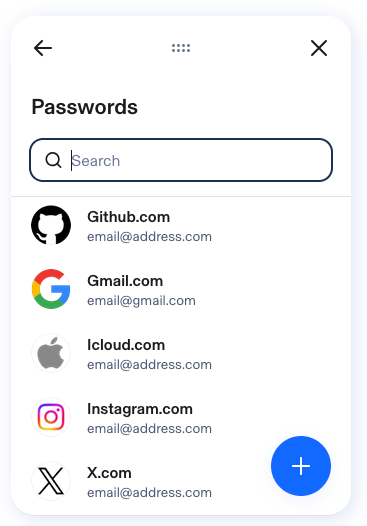
Using the Aura Password Manager vault was also easy. Having all my account credentials stored in one secure vault meant I didn't have to remember dozens of passwords or waste time resetting forgotten logins. Everything was organized and easy to find, making it simple to access my accounts whenever I needed them. If you're looking for a straightforward way to keep your passwords in one place, Aura's vault gets the job done without adding unnecessary complexity.
However, I can’t say that it’s the most convenient password vault. While using Aura, I kept thinking about 1Password because I wished Aura had its multiple vaults feature, which lets you organize passwords into different categories. It just makes it faster to find passwords and feels more organized.
Email alias protection
Another feature I really appreciated in Aura Password Manager was email alias protection. It allowed me to sign up for websites using a masked email address that cloaks my real email, keeping it hidden from the services I register with. That gave me an extra layer of privacy while I still received account updates and verification emails to my actual email address.
I also found it helpful when keeping spam out of my primary inbox, and if an alias starts attracting unwanted messages, I could simply delete it without affecting my actual email.
However, keep in mind that to mask your email address, you’ll first need to sign up and log in to a page with your actual email address, then, on the service page, you have to change your preferred email to the spoofed one.
Online security
For me, the biggest Aura’s selling point was that, for a relatively low price of $1.99/month, I got a password manager and other device security tools. Its entry plan includes real-time antivirus protection, an unlimited VPN, and protection against scams and phishing sites.
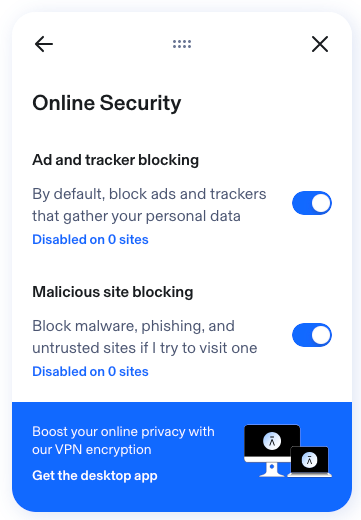
Yet, if you’re willing to pay more, the Deluxe and Ultimate plans come with extras, such as a sensitive files vault (1GB), anti-tracking, and ad-blocking. I liked that the browser extension also includes online security features that can be easily enabled or disabled, such as ad and tracker blocking and malicious site blocking.
Compatibility and ease of use
Aura Password Manager is compatible with a variety of devices. It offers mobile apps for iOS and Android, as well as browser extensions for Chrome, Safari, Firefox, and Edge. However, it falls short in the lack of a desktop app, as it mainly relies on the web dashboard and browser extensions.
| Platform | Aura Password Manager support |
| Desktop | Web dashboard and browser extensions only |
| Mobile | iOS and Android |
| Browser extensions | Chrome, Safari, Firefox, and Edge |
| Cross-device access | Automatic sync across supported browsers and mobile devices |
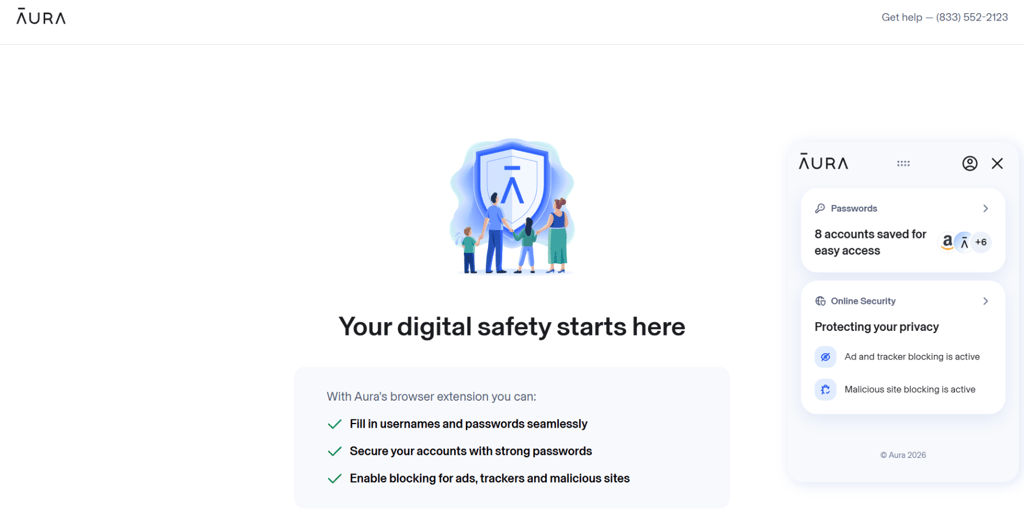
When I used Aura, I had no complaints about how this password manager works, since it’s one of the most user-friendly password managers for laptops and smartphones I’ve tested. I liked its highly intuitive interface and simplistic design. Each time I used Aura Password Manager, it successfully detected and autofilled login pages. Honestly, when using Aura, its autofill felt as smooth as using 1Password. I think these features make it a great option for inexperienced users.
Customer support
Aura offers US-based customer support via email, phone line, and live chat. What I found interesting is that you can reach support 24/7 via a phone line. Yet the agents via live chat are only available daily from 8 AM to 8 PM Eastern Time. Outside the working live chat hours, the chatbot responds to the messages.
| Support options | Does Aura offer it |
| Live chat | ✅ Yes, daily from 8 AM–8 PM EST |
| Phone support | ✅ Yes, 24/7 |
| Help center | ✅ Yes |
| Email support | ✅ Yes |
| Support requests | ✅ Yes |
| Community forum | ❌ No |
I decided to test an AI chat agent and connect to a human agent support options. I have to say that AI chat only worked like a search engine for Aura’s help center, giving me no additional information.
To get more details, I requested a transfer to a live agent. From there on, my experience was positive: I was connected to an agent in under a minute, and they answered all my inquiries quickly, with wait times under 1 minute. I also liked that Aura’s support team can assist with a variety of problems, including password manager setup, insurance claims, and identity monitoring, making this service even more valuable.
I could also look up information in Aura’s help center, which had several categories to choose from, covering the most common questions about getting started, online security, data breaches, and more.
Aura Password Manager alternatives
Aura is a good choice for an all-in-one security suite that extends beyond a password manager. However, other password managers might be a better fit for your needs.
Below, I share a short overview of our top password managers, based on their security, features, compatibility, and overall value.
| Password manager | Rating | Free version | Starting price | Multi-factor authentication | Secure password sharing | Password health reports | Device compatibility | Browser compatibility |
| NordPass | ✅ Yes | From $1.38/month | ✅ Yes | ✅ Yes | ✅ Yes | Windows, macOS, Linux, Android, iOS | Chrome, Edge, Firefox, Opera, Safari, Brave, Vivaldi | |
| Keeper | ✅ Yes | From $1.79/month | ✅ Yes | ✅ Yes | ✅ Yes | Windows, macOS, Linux, Android, iOS | Chrome, Firefox, Safari, Edge, Opera, Brave | |
| 1Password | ❌ No | From $1.99/month | ✅ Yes | ✅ Yes | ✅ Yes | Windows, macOS, Linux, Android, iOS | Chrome, Firefox, Edge, Brave, Safari | |
| RoboForm | ✅ Yes | From $0.99/month | ✅ Yes | ✅ Yes | ✅ Yes | Windows, macOS, Android, iOS, Linux | Chrome, Firefox, Opera, Edge, Brave, and Safari | |
| Proton Pass | ✅ Yes | From $2.49/month | ✅ Yes | ✅ Yes | ✅ Yes | Windows, macOS, Linux, Android, iOS | Chrome, Firefox, Brave, Edge, Safari, Web App |
Is Aura Password Manager worth it?
Based on my testing, Aura Password Manager is worth it if you're looking for more than just a password manager. I particularly liked its simple and modern design that made it really easy to use. Also, it delivers all the essentials, including reliable autofill, a password generator, secure password storage, and strong encryption, while bundling in useful extras like an unlimited VPN, antivirus, scam protection, and dark web monitoring at a competitive starting price.
While it lacks features like passkey support, multiple vaults, and dedicated protection for stored logins with 2FA, I can say that these shortcomings don't outweigh its overall value. That’s why I recommend Aura if you want an affordable all-in-one security suite.
FAQ
Does Aura have a password manager?
Yes, Aura has a password manager. It’s available on its own or with any of Aura’s antivirus plans as a bundled service.
Is Aura Password Manager only available in the US?
No, Aura also provides coverage for members in the US and its territories, including American Samoa, Guam, Northern Mariana Islands, Puerto Rico, US Virgin Islands, and Canada (if you have a valid US address).
Is Aura Password Manager good?
Yes, Aura Password Manager is good for users seeking secure password storage, autofill, and password generation in one platform. Its value is strongest for those who also want Aura's broader security suite, including antivirus, a VPN, and identity theft protection.